Hurricane Season Checklist: Protecting Your Home Network, Cameras and Backup Power
A practical Houston-area checklist for keeping your home network, cameras, and backup power ready before Gulf Coast hurricane season hits.
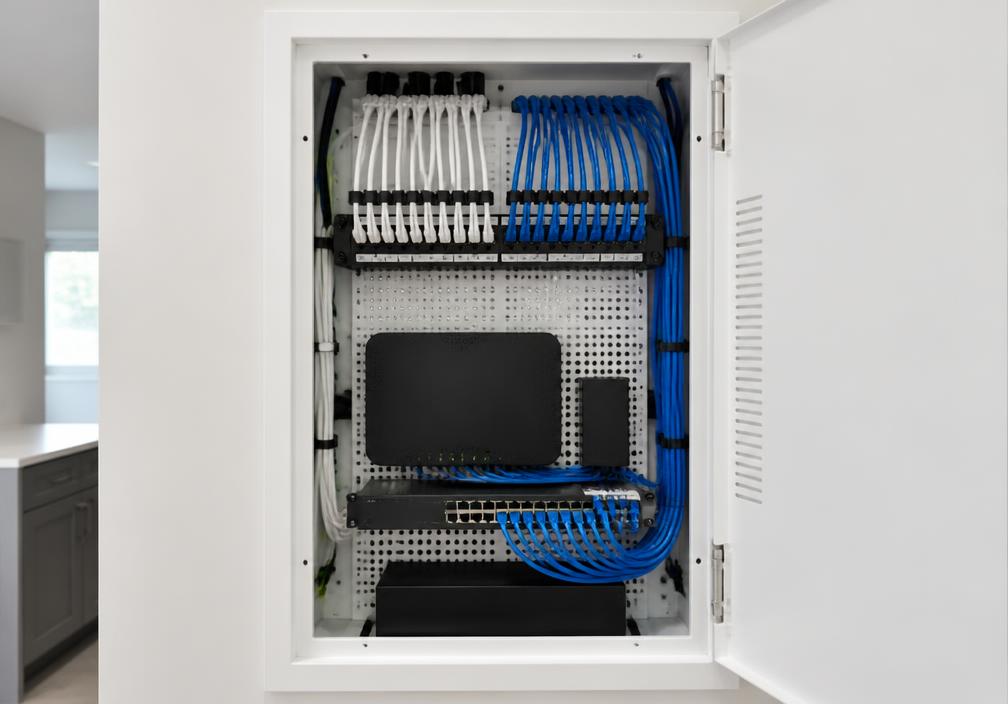
Along the Gulf Coast, hurricane season is not only about boarding windows and stocking water. For many Houston-area homeowners, it is also about whether the Wi-Fi stays up, the cameras keep recording, and the gear that runs the house survives a surge when the lights come back on. Storms can knock out power for hours or days. Even a short outage is enough to drop your modem, router, and network video recorder offline—right when you may want to check the property from your phone.
You do not need a data center in the garage to be ready. A clear plan for surge protection, battery backup, and camera coverage goes a long way. This guide walks through what to check before peak season so your home network and security cameras have a better chance of staying useful when weather turns rough.
Why home networks fail first in a storm
Most home networks depend on wall power and a clean path to the internet. When the utility drops, the modem and router shut down within seconds unless they are on a UPS (uninterruptible power supply). Cameras that plug into outlets or PoE switches go dark the same way. Battery-powered cameras may keep filming for a while, but they still need a working network path—Wi-Fi or cellular—to send clips to your phone.
Houston and nearby Gulf Coast communities also see brownouts and dirty power as storms approach and after restoration. That kind of unstable voltage can stress power supplies and networking gear even when the outage itself is short. Surge protection and a quality UPS help absorb those bumps so you are not replacing a router every time the grid flickers.
Surge protection and UPS: the foundation
Start at the wall. Plug your modem, router, network switch, and NVR (if you use one) into a UPS with surge protection—not a basic power strip alone. A UPS does two jobs: it softens surges and spikes, and it keeps critical gear running long enough for you to shut systems down cleanly or ride through a brief outage.
Size the UPS for the devices that actually need to stay on. A typical modem-plus-router stack draws modest wattage; add a PoE switch and a few cameras and the load climbs. Check the UPS runtime rating at your expected load and aim for enough minutes to finish a call, check cameras, or wait out a short blip. For longer outages, a UPS is a bridge—not a generator. Pair it with a whole-home or portable generator plan if you expect multi-day downtime.
Also protect outdoor camera power injectors and garage networking gear. Anything that sits near the edge of the house—attic switches, exterior PoE injectors, garage routers—benefits from the same surge-aware backup approach. Label UPS outlets so family members know which plugs are for critical network gear only.
Keeping cameras useful when power and internet wobble
Cameras matter most when you cannot walk the property yourself. During hurricane season, think in layers: local recording, remote viewing, and what still works if the ISP is down.
If cameras record to an NVR or local storage, put that recorder on the UPS with the network stack. Local recording can continue even when the internet is out—as long as power to the cameras and recorder holds. Cloud-only cameras need both power and a working uplink; without internet, you may lose live view and clip uploads until service returns.
Review camera placement before storm season. Cover driveway, front door, and any flood-prone side yards or gates you care about. Clear spider webs, wipe lenses, and confirm night vision still works. After heavy rain or wind, cameras can shift on their mounts—tighten brackets now so you are not adjusting them in the rain later.
For remote access, test your phone apps on cellular data (not just home Wi-Fi) so you know login and live view still work from outside the house. If you rely on a smart doorbell or outdoor cameras for package and porch coverage, make sure their chimes or hubs are also on protected power when possible.
Practical hurricane-season network checklist
Work through this list once before peak season and again if a named storm is in the forecast. Keep it simple and write down what you find—especially UPS battery age and which outlets feed which devices.
- Confirm modem, router, PoE switch, and NVR (if any) are plugged into a UPS with surge protection—not a bare strip.
- Test the UPS: pull the wall plug briefly and verify networking gear stays on and cameras remain reachable.
- Note UPS battery age; replace aging batteries before hurricane season if the unit warns of weak capacity.
- Label critical outlets and keep non-essential plugs off the UPS so runtime lasts longer.
- Update router firmware when a stable release is available; reboot once and confirm Wi-Fi SSIDs still match what your cameras expect.
- Walk the property and confirm each camera’s live view, night mode, and recording path (local, cloud, or both).
- Clean lenses, check mounts, and aim coverage at doors, driveway, and vulnerable side access points.
- Test camera and NVR apps on cellular data so you can check the house after evacuation or sheltering elsewhere.
- Photograph your rack or shelf of networking gear and note ISP account and support numbers in a waterproof place.
- If you have a generator, know which circuits feed networking and camera power—and never backfeed the panel unsafely.
- Unplug or power down nonessential entertainment gear before landfall to reduce surge risk when power returns.
- After the storm, inspect outdoor camera cables and junction boxes for water intrusion before restoring full loads.
Backup power: matching expectations to reality
Homeowners sometimes expect a small UPS to run the whole smart home for days. In practice, a UPS is best for bridging short outages and protecting gear. For multi-day Gulf Coast outages, plan a handoff: UPS for the network core, then generator or larger battery storage for sustained power if you have it.
Prioritize what must stay online. Many families choose modem, router, a small PoE switch, and key cameras—not every smart bulb and speaker. That lighter load stretches UPS minutes and reduces heat in a closed utility closet. If you add cellular failover or a travel router later, place that gear on the same protected circuit so failover actually has power when the primary ISP drops.
Finally, practice once on a calm weekend. Kill power at the UPS input, open your camera app, and see what still works. Fix gaps now—extra PoE injector on the UPS, a camera remount, a dead UPS battery—while stores are open and roads are clear. First Choice Smart Solutions can help Houston-area homes design UPS-backed networking and surveillance layouts that hold up better when hurricane season tests the grid.